GitOps deployments.
Portainer's GitOps model is normalized around two entities: a Source is the thing that is polled, and Workflows describe what gets deployed from it. That normalization solves a set of problems Argo CD and Flux either duplicate or ignore, and it is where most operator "how does this work?" questions land. This module walks the model, the deployment mechanics, edge stacks, and where Portainer coexists with (or replaces) Argo and Flux.
The sources and workflows model
Every GitOps object in Portainer belongs to one of three types. A Source is the thing that is polled: a Git repository, a Helm repository, or an OCI registry reference. A Workflow is a named unit that owns one or more artifacts. An Artifact is one deployment target: a Stack (regular) or an EdgeStack (fleet), plus the files from the source that back it and the environments or edge groups it targets.
The normalization matters. In most GitOps tools, the "poll this repo" and "deploy this stack" are one concept, so if you have three stacks in one repo you effectively poll the repo three times. Portainer polls the source once; the workflows and artifacts referring to that source get evaluated together on each poll. If a change is detected, only the affected artifacts redeploy.
Two more design decisions worth naming. Access to a repository is controlled at the source, not scattered per deployment; a user only sees and uses sources they are entitled to, and admin-only endpoints govern who can update a source's access list. And the polling interval lives on the source, not on the individual stacks; if you have two stacks in one repository that want to poll at different intervals, you split them into two sources.
Sources: the polled entity
A source's job is to be the polled dependency; everything else is derivative. A source carries: a type (git, helm, or oci), a location (URL or reference), credentials, a TLS posture, an interval, and an access list of which users and teams can consume it. That is all.
Source-level operations: create, list, summary view, get detail, list workflows backed by this source, test connection (standalone or against a saved source), update, and delete. Deleting a source is only possible when no workflow artifact references it; a repo that appears to keep polling after you deleted "all its stacks" is one where an orphan workflow artifact still holds it open. Inspect the source's workflow list (/api/gitops/sources/{id}/workflows) to find the culprit.
Sources are user-context scoped on reads. A user querying "list my sources" gets back only sources they have access to; a user creating a workflow can only reference sources they can see. This is the entitlement model behind the whole surface, and it is why "user B cannot see the source user A created" is by design rather than a bug; check the source's access list.

Workflows and artifacts
A workflow is a named unit that owns one or more artifacts. A workflow does not itself poll or deploy; it groups artifacts that logically belong together (a product's frontend and backend stacks, for example) so that operators think about them as one thing while Portainer processes them individually.
An artifact is one deployment target. It has: a source ID (which source's poll drives it), one file entry (source ID plus branch or ref plus path - exactly one file per artifact), a stack ID or edge stack ID (which deployment target this maps to), and at least one target (either an environment ID for a regular stack or an edge group for an edge stack). A workflow's detail view (from GET /api/gitops/workflows/{id}) returns one detail entry per artifact including git-sync error state, which is what makes the workflow the right level of detail to open when triaging.

Deleting a workflow has two removal semantics: detach (DELETE /workflows/{id}/detach) removes the workflow's GitOps linkage but leaves the deployed workloads running (the stack stops being git-managed), while destroy (DELETE /workflows/{id}/destroy) tears down the deployed stacks and edge stacks as well. If you click the "wrong" delete and workloads disappear, this is why.
Git source specifics
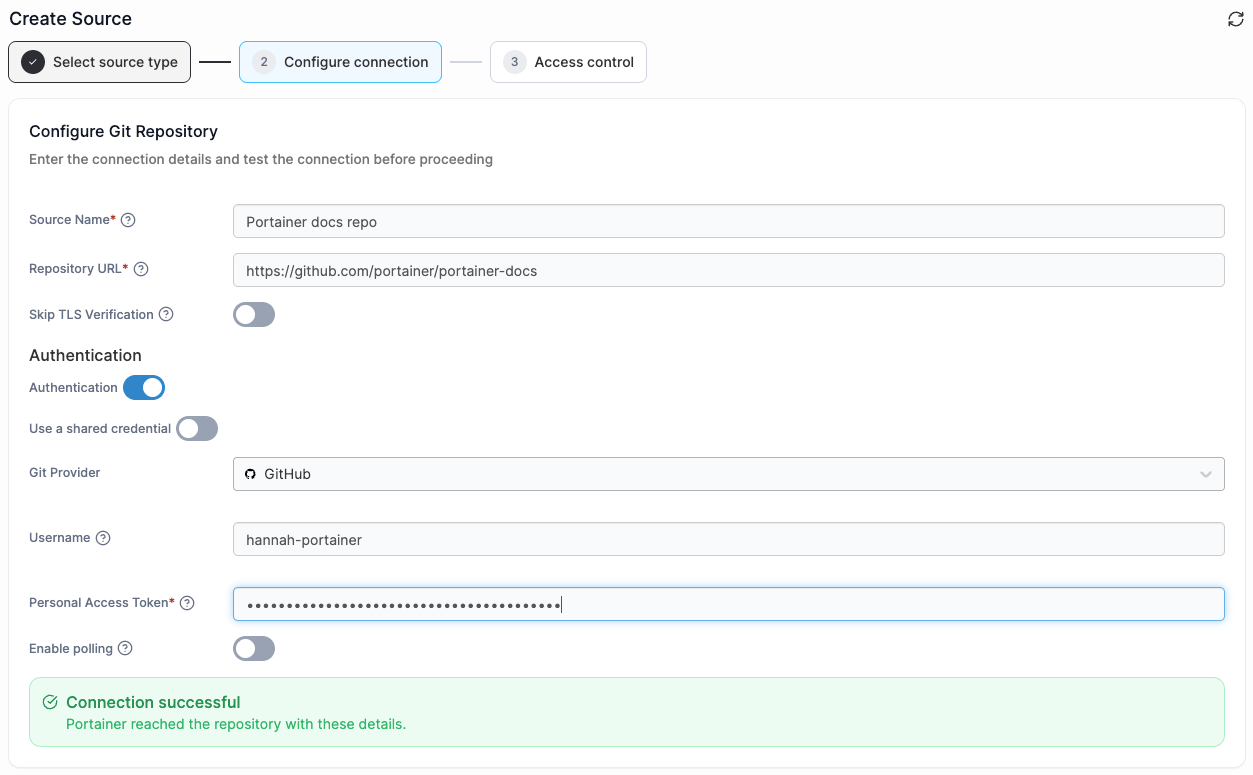
Git sources carry a provider designation: custom, github, gitlab, bitbucket-cloud, bitbucket-datacenter, azure-devops, or gitea-forgejo. The provider drives provider-specific API behavior (branch listing, file preview, and webhook validation each use the provider's native API where applicable). "Custom" is the generic path for anything not in the provider list.
Credentials come from one of two places: credentials attached to the source itself (private, admin-owned) or a shared git credential (created separately, referenced by ID). Shared credentials matter when many sources reference the same repository system; rotate one credential, every source using it picks up the change. Anonymous access is fine for public repositories.
TLS posture: sources speaking HTTPS to a git host verify by default. A self-signed CA is supported by attaching a CA bundle to the credential or the source. Disabling verification is not the answer if you are hitting cert errors; get the CA bundle right instead.
Create a small git repository (any provider) with two directories, each containing a docker-compose file. Register it as a source in Portainer with a 60-second polling interval. Test the connection from the source detail view; it should return successfully. Note the source's ID; you will use it in the next chapter.
For further details on git source specifics, see the Portainer documentation.
Helm and OCI sources
Helm sources are the same shape as Git sources but the location is a Helm repository index URL and the "file" reference is a chart name plus version. When the source polls, Portainer refreshes the repository index; when a chart artifact is updated, the workflow triggers a chart-based redeploy of the target stack.
OCI sources reference an OCI registry containing OCI artifacts (Helm charts packaged as OCI images, or other OCI content). Under the hood the OCI type maps to Portainer's internal registry source type, which means an OCI source's authentication and TLS posture come from a registered Portainer registry. If you already have a private OCI registry configured (Module 8, registry governance), OCI sources reuse those credentials rather than duplicating them.
Helm and OCI sources are the path to catalog-driven deployments. Chart repositories and OCI artifact registries are the industry-standard delivery channels for packaged Kubernetes applications; Portainer's GitOps model treats them as first-class sources rather than as afterthoughts.
Polling and webhooks
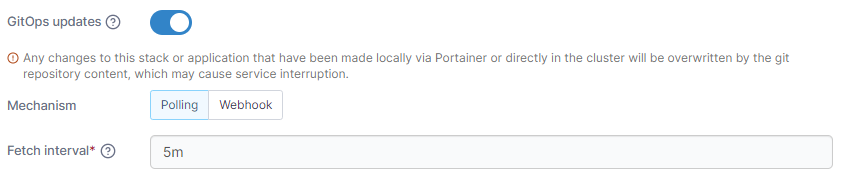
Polling runs one job per source at the source's interval. When the poll detects a change (a new commit on the tracked ref, a new chart version, a new OCI tag), each artifact backed by that source is evaluated for redeploy. Artifacts that already point at the current version are skipped; artifacts pointing at an earlier version trigger the per-stack redeploy flow (chapter 07).
Polling has a singleflight guard on the artifact side: concurrent poll ticks for the same stack are deduplicated so they cannot stack up as duplicate redeploys. This is the mechanism that keeps a fleet from flapping when you accidentally set a 5-second polling interval on a repository that gets frequent commits.
Webhooks are the alternative. Portainer exposes a webhook URL per stack; a git provider or CI system POSTs to it on push, and the artifact's redeploy runs immediately without waiting for the next poll tick. Webhooks bypass the singleflight (they are user-triggered, not scheduler-triggered) but they still go through the full redeploy flow, including the change window check and the author-resolution step from chapter 09.
"The webhook returned 200 but nothing deployed" is one of the most common triage tickets in a GitOps rollout. Two causes account for almost every case: the target environment has a change window and now is outside it (the deploy was silently skipped), or the commit did not actually change against the stored deployed hash (nothing to deploy). Both are correct behavior; check both before assuming a webhook or auto-update defect.
For further details on polling and webhooks, see the Portainer documentation.
The redeploy flow
Whether triggered by polling or by a webhook, the redeploy flow (RedeployWhenChanged) follows the same sequence. Understanding this sequence is the difference between "why did nothing happen" and "here is where it stopped."
- Inactive stacks are skipped immediately.
- Any additional environment variables are upserted into the stack env before deploy.
- Environment is looked up; a deleted environment makes the scheduled job a permanent error (rescheduling stops).
- If the environment's group has a setup policy, that policy applies to the endpoint settings before deploy.
- Change window check: if the endpoint has a change window enabled and the current UTC time is outside it, the redeploy is silently skipped with a debug-level "not in update window" log line.
- Author resolution: the stack redeploys AS its author (UpdatedBy, falling back to CreatedBy). If that user no longer exists, the redeploy fails with StackAuthorMissingErr and a warn-level "cannot auto update a stack, stack author user is missing" log.
- Offline environments are silently skipped (an offline environment cannot be deployed to; a webhook or poll firing while the environment is offline is a no-op).
- Git clone/fetch runs with the stored credentials, and the commit hash is compared against the stack's stored deployed hash. Only actual changes trigger redeploy, unless force or repull flags say otherwise.
- On Kubernetes, rollout-restart options can bounce workloads even when the manifests did not change (useful when a repull is required).
Reading that sequence back through the "what's the answer to why did nothing happen" lens: check step 5 (change window), step 6 (author still exists), step 7 (environment online), step 8 (commit actually changed). Ninety percent of triage lands somewhere in there.
Change windows
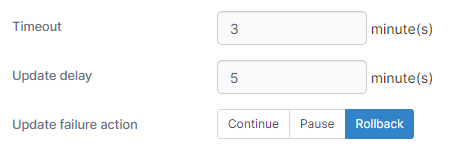
A change window is a scheduled window during which auto-updates and webhook-triggered redeploys are permitted; outside the window, they are silently skipped. Configure the window per endpoint (or leave it disabled, meaning "any time is fine").
Change windows exist for a specific reason: change-management processes want deploys to happen inside defined maintenance windows, not whenever a developer pushes to main. A production Kubernetes cluster with a "22:00-02:00 UTC" change window will accumulate commits during the day and deploy them all at 22:00; the operator does not have to hold the merge button until midnight.
End time earlier than start time means the window spans midnight (a 22:00-02:00 window is legal and covers 22:00 to 02:00 the next day). Time comparisons are in UTC; if your operational calendar is in a non-UTC timezone, translate carefully.
Manual deploys ignore the change window. A user clicking "deploy" in the Portainer UI is not the redeploy flow; it is the manual deploy flow. Change windows suppress polling-driven and webhook-driven deploys only. This is deliberate; the operator wanted the deploy to happen now, and the change window is for automation.
Reproduce the classic support ticket: "the webhook returned 200 but nothing deployed." Take the git-managed stack you registered in chapter 04. Copy the stack's webhook URL and register it in your git provider (GitHub, GitLab, or a curl call from your own machine works too). Push a small commit; watch the deploy fire within a second or two through the webhook path, not the poll path. Now, on the target environment, configure a change window that starts 15 minutes in the future. Push another commit. The webhook still returns 200 (that is the server accepting the delivery), but the deploy does not run; the server log carries the debug line "not in update window. ignoring changes/webhooks." Wait for the window to open; the deploy runs on the next poll tick. Both are correct behavior, and this is the reproduction to walk through when you are convinced the webhook is broken.
Deploy as author
The most consequential design decision in Portainer's GitOps model is this: a stack redeploys as its author. The Portainer user identified in the stack's UpdatedBy field (or CreatedBy if UpdatedBy is unset) is the effective author, and the redeploy runs with their registry authorization set for pulls and their team-derived Kubernetes access for applies.
Why this matters. If the author was offboarded, or lost registry access, or was moved to a different team with fewer permissions, the redeploy will fail even though "the code" and "the environment" are both fine. The failure surfaces variously: StackAuthorMissingErr if the user record is gone; image pull errors if the author lost registry access; permission errors on the Kubernetes side if the author's team assignments no longer cover the target namespace.
The fix pattern is the same in all cases: another user with the right access performs a manual update on the stack (any update; the point is to reset UpdatedBy). From then on, the redeploy flow runs as the new author.
The right structural fix, if you hit this repeatedly, is a service-account-style stack author: a Portainer user that exists specifically to own GitOps stacks. That user does not get offboarded when humans leave; their registry and team assignments are managed as service infrastructure rather than as personnel. Adopt this if you have real turnover, not just as a workaround.
The registry authorization aspect of author-based redeploy is subtle. An operator with full registry access clicking "manual update" will pull fine; the same stack under a webhook trigger will fail with "cannot pull" because the author's registry access set is different. This is not a bug; it is the deploy-as-author model working correctly. Track the author, not the operator.
Reproduce the offboarding failure mode. Create a Portainer user (say, test-author) with permission to deploy on one of your environments. Log in as that user; create a git-managed stack from the git repo you registered in chapter 04. Confirm it deploys and shows test-author as CreatedBy. As admin, disable then delete test-author. Push a commit to the git repo. On the next poll (or by firing the webhook), the redeploy fails; the server log carries the warn line "cannot auto update a stack, stack author user is missing." Now, as admin, click "update" on the stack (which resets UpdatedBy to admin). Push another commit; the redeploy succeeds under the new author. This is the offboarding pattern that quietly stops GitOps months after someone leaves, and the fix pattern to walk through when you hit it.
Edge stacks
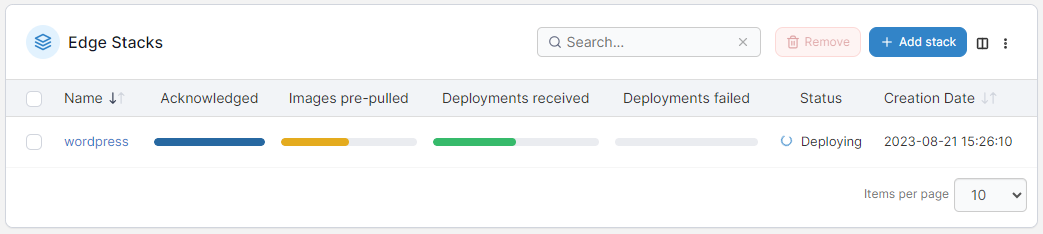
Edge stacks are how you deploy declaratively to edge fleets. Instead of "deploy this stack to environment X," you say "deploy this stack to edge group Y," and Portainer computes the target set (which may include hundreds of edge environments), stores per-endpoint deployment status (EdgeStackStatus dataservice), and delivers the work through whichever channel the target environment uses.
On standard-mode edge agents, the poll response carries the stacks array with per-stack Version, ForceRedeploy, and RepullImage flags. Agents pick up new versions and redeploy. On async-mode edge agents, deployment commands are enqueued; staggered rollouts generate per-endpoint deployment commands over time (which is what lets you push an update to a fleet without hammering all of them simultaneously).
Agents report status back. Standard mode uses the stack-inspect and status endpoints; async mode returns status inside the periodic snapshot (stackStatusArray plus stackLogs, stored in the edgestacklog dataservice). If an edge stack is stuck "pending" on some devices, either those agents have not polled yet (offline, or interval elapsed), or in async mode the command is still queued.
Git-backed edge stacks are edge stacks whose source of truth is a git repository. The server re-checks the repo through the source scheduler, bumps the stack version when a change is detected, and agents notice the version change on their next poll. This is how you get fleet-wide GitOps to edge environments.
If you have an edge environment onboarded from Module 6, create an edge stack targeting the edge group it is in, backed by a small compose file in your git source from chapter 04. Commit a change; watch the source poll pick it up, the stack version bump, and the agent redeploy on its next poll.
For further details on edge stacks, see the Portainer documentation.
Templates and catalog
Templates and catalog is capability #6 from Module 1. In Portainer's model, a template is a pre-authored stack definition (compose file, Kubernetes manifest, or Helm chart reference) plus optional variables, published for consumers to instantiate without writing YAML.
The template catalog is fetched from the portainer/templates repository by default; an administrator can override the catalog URL in Settings. Templates are the operator-approved deployment surface: a developer opens the catalog, picks a template ("Redis single-node," "WordPress with MySQL," "an internal application"), fills variables (namespace, hostname, resource size), and clicks deploy. The stack that results is a normal Portainer stack, and it can be GitOps-managed retroactively by attaching a workflow to it.
For internal use, publish your own template catalog: a git repository whose contents follow the Portainer template schema, and your Portainer server points at that URL. This is how you give an enterprise developer team a curated deployment surface without exposing every possible template.
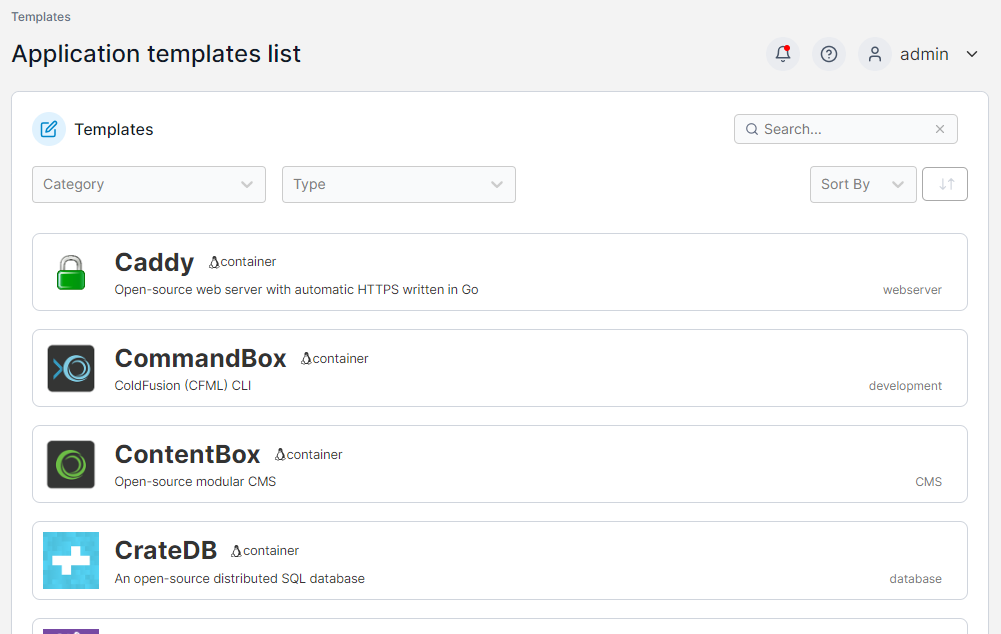
For further details on templates and the application catalog, see the Portainer documentation.
Portainer GitOps vs Argo CD, Flux
Every enterprise deployment eventually raises the question of Argo CD or Flux. The honest answer is that Portainer's GitOps sits alongside them, not against them, and the right framing depends on where you are today.
Argo CD is a distributed controller: it runs inside each cluster it manages, reconciles from git into that cluster's state, and provides an application-centric UI. Flux is similar but uses controllers per resource type and integrates with a wider toolset. Both are excellent at what they do; they are also both cluster-scoped, which means multi-cluster fleet governance is a separate problem you solve with a second layer.
Portainer's GitOps is centralized: one source, polled once, driving deployments to any environment or edge group. This design serves the "one team governing fifty clusters" case naturally; Argo and Flux serve it awkwardly (Argo needs an "application set" pattern; Flux needs fleet extensions). Portainer's source-and-workflow abstraction also handles Docker Standalone and Docker Swarm targets, which Argo and Flux do not.
Where they coexist. If you are running Argo CD inside your Kubernetes clusters, you can leave it running; Portainer manages the cluster as an environment, and if you want to keep pushing application deployments through Argo, that is fine. Portainer's GitOps is not a replacement obligation. Where Portainer replaces them is: if you have not yet standardized on Argo or Flux and want a single control plane, if you have a mixed Docker/Kubernetes estate where Argo and Flux only solve half the problem, or if your platform team is too small to run Argo as a separate product.
The load-bearing distinction: Portainer's GitOps is designed for operators managing fleets; Argo and Flux are designed for developers managing applications. Both are legitimate; the choice depends on who owns the deploy path.
Detach vs destroy revisited
Chapter 03 mentioned the two removal semantics for workflows. The distinction is important enough to reprise, because you will hit it the first time you clean up.
Detach removes the GitOps linkage. The workflow disappears from the workflows list; the source's poll job releases (if this was the last artifact); the stack keeps running. From then on, the stack is a normal manually-managed stack; you can delete it separately, or leave it running, or attach a new workflow later.
Destroy removes the linkage and tears down the deployed workloads. The workflow disappears; the stack (or edge stacks) are removed through the teardown service; on Kubernetes that means the manifests get deleted from the cluster, and on Docker the containers get stopped and removed.
The naming is deliberate but easy to click through. If you ever find yourself saying "I removed the workflow and my production is down," this is the wrong-button case. There is no undo. The mitigation is a Portainer datastore backup taken before the destructive action; if it exists, restore, then use detach next time.
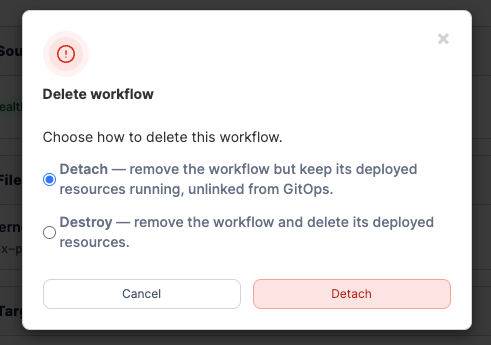
Feel the difference in a safe environment. Create two throwaway git-managed stacks against a lab environment (both running a small container like nginx). On the first workflow, click Detach; confirm the workflow is gone from the workflows list but the underlying stack keeps running and the container is still up. On the second workflow, click Destroy; confirm the workflow is gone and the underlying stack and container are gone with it. Now try to bring back the destroyed stack from Portainer; you cannot without redeploying from source. This is what you are choosing between when you click one of the two buttons, and it is why the naming needs to be internalized before you touch a production workflow.
What is next
Module 10 covers observability and day-2 operations: the embedded Prometheus and Alertmanager, notification receivers, SIEM export, and the operator surface for containers, pods, and log streams. It is where the platform earns its keep after everything is deployed.
Next: Module 10 · Observability and Day-2