Fleet Management.
Forty industrial edge sites, three regional Docker Swarms, and a Kubernetes cluster in the data center are not managed as fifty individual environments; they are managed as a fleet. This module walks the identity primitives that make a fleet coherent (groups, edge groups, tags), the edge compute surfaces that deploy across it (stacks, jobs, configurations), the policy engine that enforces consistent configuration at fleet scale, the distribution mechanics that get policy to mixed and async environments, and registry governance as one specific application of fleet-wide policy.
Fleet as the operating model
Once you have more than a handful of environments, the operationally sane way to reason about them is by group, not by individual. A change (new registry, new policy, new edge stack) is applied to the group; every environment in the group inherits the change; a new environment added to the group inherits everything that came before it. This is what "fleet" means in Portainer.
The alternative is manual per-environment configuration, which is fine at five environments, painful at twenty, and unmanageable at a hundred. Every large deployment that has tried it has ended up with drift: environments that should be identical but are not, because someone updated one and not the others; environments that were supposed to inherit a policy but did not, because the policy was scoped wrong; environments that lost configuration when someone re-onboarded them. Fleet primitives eliminate that class of problem by making the group the source of truth and the individual environment a member of one or more groups.
This module builds on Module 7. Environment groups are introduced there as the tenancy boundary for RBAC; here they are also the boundary for policy, registry, and (through edge groups) fleet deployment. The two are the same construct viewed through different lenses.
Groups, edge groups, and tags
Three primitives, each with a distinct job. Environment groups scope RBAC and policy: a group holds a set of environments and a set of access policies (teams and roles), and any policy attached to the group applies across every matching environment. Edge groups scope edge-specific concerns: edge stacks, edge jobs, and edge configurations target edge groups, not environment groups, and they can include environments that live in different environment groups. Tags are freeform strings applied to environments; they feed into dynamic edge groups and into UI filters, but they do not enforce anything themselves.
Edge groups come in two shapes. A static edge group holds a specific list of environments; you add and remove members explicitly. A dynamic edge group holds a tag rule ("all Docker edge devices tagged retail-store") and its membership is computed on the fly; any environment matching the rule at request time is a member. Dynamic groups are the mechanism you use for fleet growth: pre-existing edge stacks, edge configurations, and policies reach a new device the first time it polls, because the fleet operations targeted the group and the new device satisfies the rule.
Tags are for filtering and for dynamic group membership. Use them for the operational shape you actually have: region, location, customer, environment stage, hardware family, connectivity class. Do not use tags for tenancy (environment groups do that); do not use tags for RBAC (environment groups do that too); use them where filter and dynamic-membership are the right primitive.
Environment overrides
Groups establish defaults; environment-level configuration overrides them where needed. Edge check-in intervals, for example, default to the global Settings value but can be overridden per endpoint. If your industrial fleet has three sites with different link characteristics, you can globally set a sane default and override per site. Similarly, endpoint-level access policies override group-level ones; use with care, because overrides scattered across environments create the exact operational drift the group model is designed to prevent. Prefer groups; use overrides for genuine per-environment exceptions.
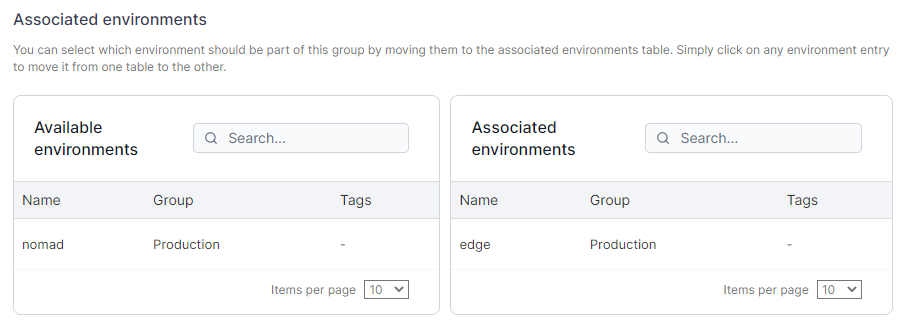
Tag two of your environments with a shared tag (say, lab). Create a dynamic edge group with the rule "all environments tagged lab." Confirm both environments appear in the group's membership. Add a third environment with the same tag; it should join the group automatically. Remove the tag from one environment; it should leave the group.
Edge compute surfaces
Portainer's edge compute story is three surfaces sharing one distribution model. Edge stacks deploy container workloads across an edge group; edge jobs execute one-off or scheduled commands across an edge group; edge configurations distribute file-shaped configuration (certificates, ini files, environment-specific YAML) across an edge group. Each surface targets an edge group as its unit of scope; each surface uses the agent's poll (standard) or async command exchange (async) as its distribution channel; each surface honors the same authorization from Module 7.
Edge stacks are the workload primitive. An edge stack is a Compose file (for Docker), a manifest (for Kubernetes), or a Kubernetes manifest deployed as a Helm release, targeted at an edge group. When you save an edge stack, Portainer schedules its distribution to every environment in the group; each environment's agent picks up the stack on its next poll (edge-standard) or command tick (edge-async) and deploys it locally. Version numbers on the stack let the agent know when to re-deploy; if the stack has not changed since the agent last saw it, nothing happens.
Edge jobs are the command primitive. An edge job is a script or command scheduled against an edge group; the schedule can be one-shot or recurring (cron-shaped). On the schedule, every agent in the group runs the command locally and reports the result back to the server. Useful for fleet-wide maintenance (log rotation, cache purge, health probes), for one-off remediation (restart a service across every device in a region), and for opportunistic data collection (gather a diagnostic on every device before next week's software rollout).
Edge configurations are the file-shaped configuration primitive. An edge configuration is a set of files targeted at an edge group; on the next poll or tick, each environment's agent writes those files to a defined location on the host. This is how you distribute per-site certificates, per-region ini files, or per-device secrets that come from a fleet-scoped source (Vault, a rendering pipeline) rather than being baked into an image.
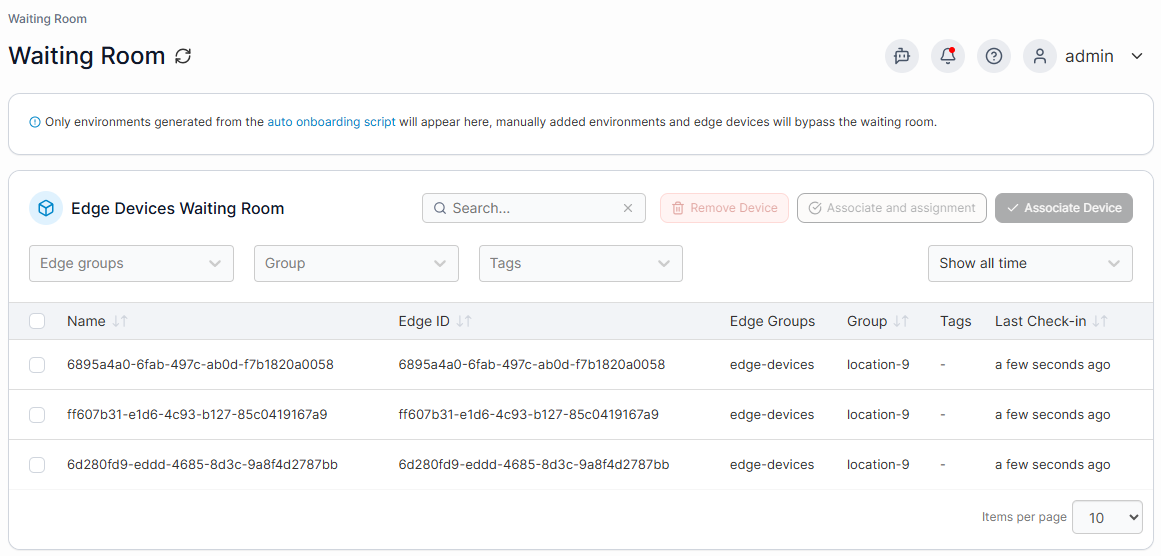
For further details on edge compute surfaces such as edge stacks, edge jobs, and edge configurations, see the Portainer documentation.
The policy engine
Portainer policies are governance rules attached to environment groups; they enforce a rule across every matching environment in that group. Policies are typed; each type has an enforcement class, a minimum agent version, an environment-type applicability list, and a per-endpoint status the UI aggregates into a StatusBreakdown (Applied / Warning / Failed / InProgress / NotSupported). The policy engine is where "consistent configuration across the fleet" stops being an aspiration and becomes an enforcement surface.
Two enforcement classes are worth understanding. Helm-reconcile policies (rbac-k8s, security-k8s, setup-k8s, registry-k8s, observability-k8s, network-security-k8s) are applied by the agent as a Helm chart into the cluster. Detach reverses the chart. If a policy is removed but its resources remain, that usually means the agent's restore coordinator failed to reverse the chart cleanly; check the agent logs. Resource-patch policies (currently pod-security-standards-k8s) apply owner-scoped field patches to existing cluster resources. Detach reverses those patches. Ordering matters on detach: patches are removed first, then the underlying chart, if any; this is why detach-then-reattach flaps look messier than clean removal.
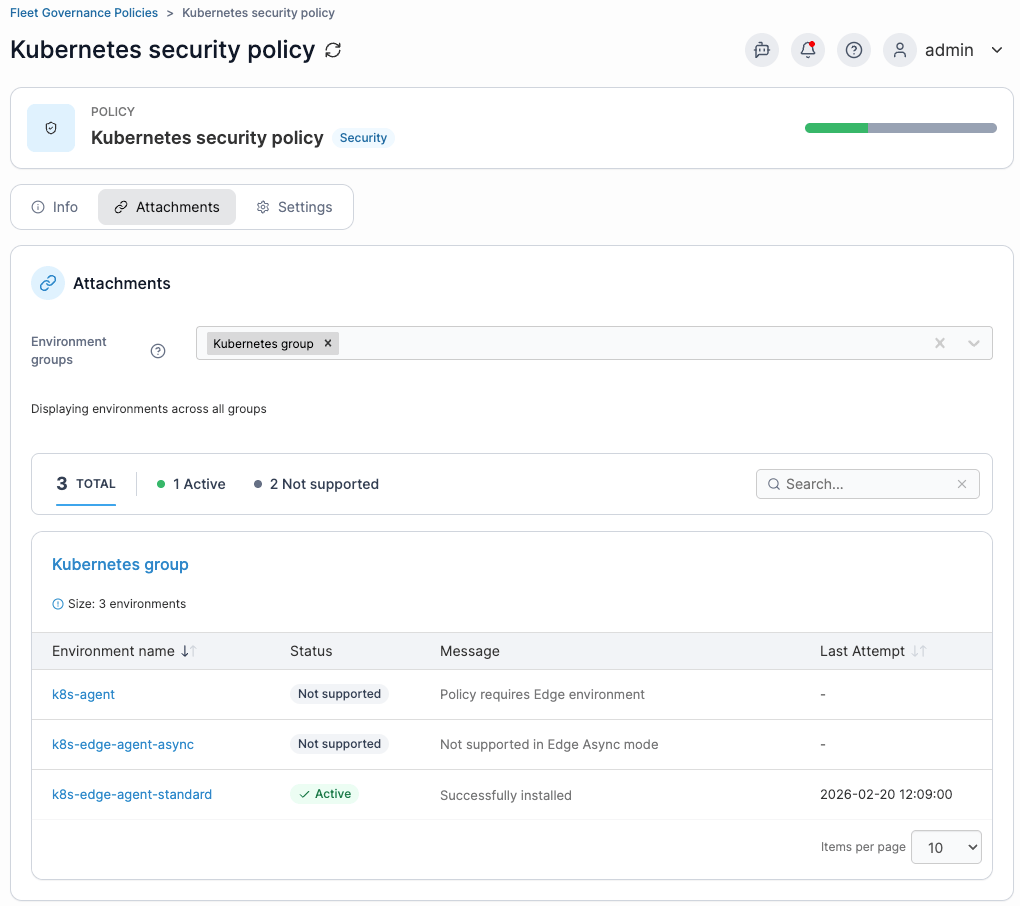
The applicability list on each policy type matters. A policy that only applies to Kubernetes environments will show NotSupported on Docker environments in the same group; a policy that requires a minimum agent version (many of the newer policy types do) will show NotSupported on environments running older agents. NotSupported is a real state, not a failure; it means the environment is out of the policy's scope by design, not that the enforcement failed. Aggregate StatusBreakdown counts NotSupported separately from Failed for exactly this reason.
Two policies of the same type covering overlapping environment groups conflict; the conflict endpoint returns them at assignment time so you can resolve before saving. Do not save conflicts; the aggregate StatusBreakdown will end up meaningless, and the underlying enforcement will oscillate.
Attach a pod-security-standards-k8s policy to one of your Kubernetes environment groups. Watch the StatusBreakdown populate; on your KubeSolo clusters (which run current agents) the policy should apply. If you have a way to test with an older agent, you should see NotSupported instead. Detach the policy and confirm the changes reverse.
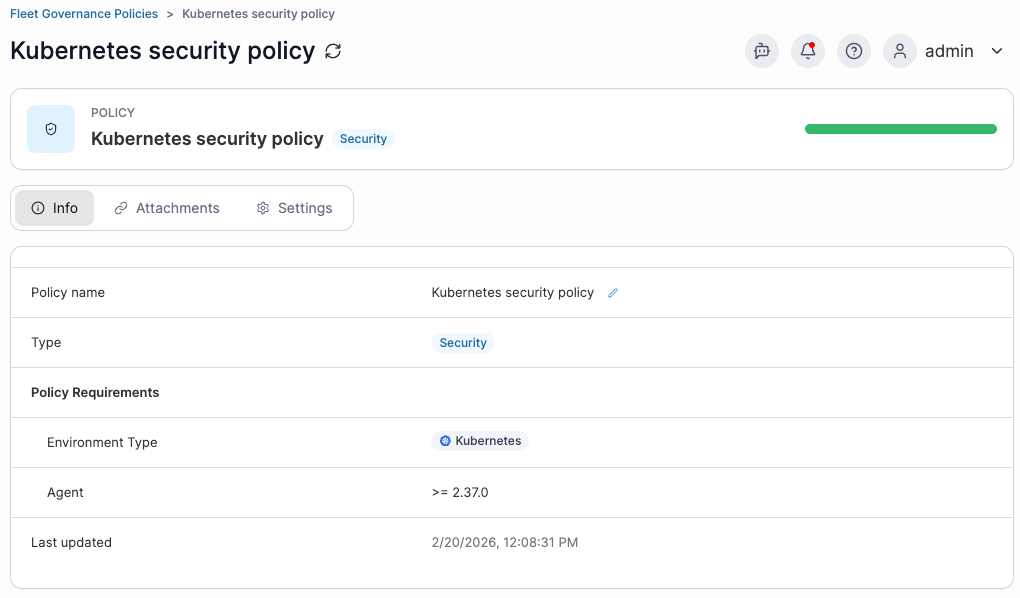
For further details on the policy engine, see the Portainer documentation.
Policy distribution to mixed and async fleets
Policy attaches to a group; distribution happens per environment inside the group; each environment picks the policy up through the agent channel appropriate to its mode. Standard-mode agents receive policy state in their poll response; edge-standard agents receive it the same way through the tunnel; edge-async agents receive it in the command exchange on their next command tick. In all three cases, the agent applies the policy locally and reports the result back; the server aggregates into StatusBreakdown.
Async environments have a specific requirement worth calling out. Policy distribution to async environments only happens when the async-policies feature flag is turned on. Without the flag, policies attached to a group containing async environments will silently not reach those environments, and the per-endpoint policy status will show them as unaddressed rather than failed. Turn the flag on if you have async fleet and want policies enforced there; leave it off if your async fleet is deliberately not policy-managed (some industrial deployments treat the async agent as a pure command channel and manage configuration entirely through edge configurations).
Mixed groups (Docker and Kubernetes environments in the same environment group) behave predictably: policies with a Kubernetes-only applicability list show NotSupported on the Docker environments, and policies with a Docker-only applicability list show NotSupported on the Kubernetes environments. A mixed group is fine when the tenancy shape justifies it (your dev group holds one Docker Swarm and one Kubernetes cluster used by the same team); do not over-tune the applicability list around the mix, let NotSupported carry that state.
Registry governance
A registry in Portainer is a stored reference to a container image registry: address, credentials, and per-environment access controls. Portainer supports Docker Hub, AWS ECR, Quay.io, ProGet, Azure ACR, GitHub Container Registry, GitLab, and any registry that speaks Docker Registry v2. Each type has provider-appropriate credential handling; ECR gets IAM-style access keys, ACR uses Azure credentials, and the generic v2 case uses username and password.
Registry governance is not about hosting a registry; Portainer does not embed one (Harbor and the cloud registries do that). It is about controlling which environments can pull from which registry and which teams inside an environment can consume it. Registries are stored objects, and access is granted per team on Docker environments and per namespace on Kubernetes environments. The Kubernetes path also handles image pull secrets: Portainer creates them in the target namespace when a registry is granted access there, and rotates the secret contents when the underlying registry credential is updated.
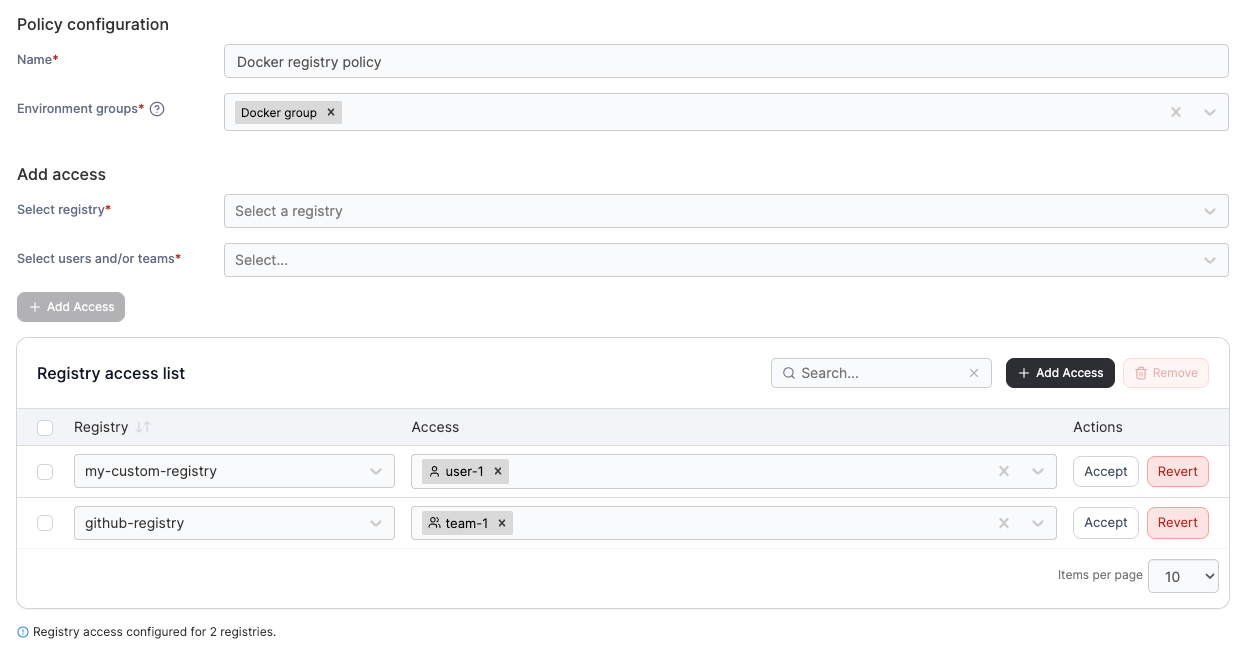
The registry-k8s and registry-docker policies fleet-scope this: a policy attached to a group can enforce a registry list across every environment in the group. Adding a new environment to that group means the registry policy applies to it automatically; removing the policy detaches the configuration. This is registry governance as fleet policy, and it is why registry lives in this module rather than in the AAA module: the interesting operational surface is the policy, not the registry object itself.
On GitOps-driven stack redeploys, registry pulls run under the stack author's registry authorization, not the operator triggering the redeploy. If the author was offboarded or lost access to the registry, redeploy will fail with pull errors even though a manual deploy by another user works. The fix is updating the stack (which resets UpdatedBy) or moving to a service account model for stack authorship. Module 9 covers the GitOps deploy path where this shows up.
For further details on registry governance, see the Portainer documentation.
Prove access control end-to-end. Register Docker Hub (or a private registry you control) in Portainer. Grant access to one of your Kubernetes environments, but only in a single namespace (say, registry-lab). Deploy a small app that references an image from that registry into the registry-lab namespace; confirm the pod comes up. Now try the same deploy into a different namespace on the same environment where you did not grant the registry; confirm the pod fails with an ImagePullBackOff because the pull secret does not exist there. Revoke the registry grant on the working namespace; redeploy; the pod fails again. The mechanism is per-namespace pull secrets that Portainer creates and removes as you change the grants, and this is what makes registry access enforceable across a mixed team.
Integrated, not replaced
Portainer's policy engine is one enforcement surface; it is not the only one, and for some enforcement shapes the right answer is a purpose-built tool sitting alongside.
Kyverno and OPA. Both are Kubernetes admission controllers with rich policy languages (Kyverno uses YAML that reads like Kubernetes objects; OPA uses Rego). If you need deep admission-time enforcement (mutating webhooks, complex validation rules that inspect multiple resources together, policies that require Rego's expressiveness), Kyverno or OPA is the answer. Portainer's policy engine handles governance-shaped policies (registry lists, security posture, network defaults, observability enrollment); Kyverno and OPA handle admission-shaped policies. Deploy them into the cluster; Portainer manages their Kubernetes objects the same way it manages any other workload.
Falco and runtime security. Portainer does not do syscall-level anomaly detection. Falco is the standard open-source answer; commercial alternatives include Sysdig Secure, Aqua, and StackRox. These sit in-cluster and detect at runtime; Portainer complements them by making the events visible (Module 10 covers alerting) and by governing policy through security-k8s at deploy time. Runtime and admission are two different jobs; deploy both if your security posture warrants.
Container registries. Portainer does not embed a registry. Harbor is the standard open-source answer; ECR, ACR, GAR, GitLab Container Registry, and JFrog Artifactory are the standard commercial ones. Portainer integrates with all of them through the registry chapter above; you pick the registry that fits your operating model, and Portainer governs how the fleet consumes it.
The pattern is consistent with the rest of the course. Portainer is the operator control plane; the integrations are the specialist products it coordinates. Never sell Portainer as a replacement for Kyverno or Falco; sell it as the fleet layer that governs how those products are deployed and configured across every environment consistently.
Fleet lab
The end-to-end lab that ties this module together. You should have at least two Kubernetes environments (KubeSolo counts) and, ideally, one Docker environment onboarded from Module 6.
Create an environment group called lab-fleet and add both Kubernetes environments to it. Attach a pod-security-standards-k8s policy to the group and confirm both environments show Applied in the StatusBreakdown. Create a dynamic edge group with the tag lab, then apply that tag to your Docker environment as well; the edge group should include the Docker environment. Create a small edge stack targeting the edge group (a container running nginx:alpine is fine) and confirm it deploys to every member. Now detach the policy and remove the edge stack, and verify everything reverses cleanly.
What is next
Module 9 covers GitOps deployments: sources and workflows, poll versus webhook, change windows, and how Portainer's model differs from Argo CD and Flux. Fleet governance and GitOps overlap where an edge stack is driven from a git source rather than an inline definition, and Module 9 walks that overlap.
Next: Module 9 · GitOps deployments